pondělí 17. března 2014

Interactive Board Advanced

A  What should the teacher do?

- present text, images, sound, animations, video, links
- give the class a chance to think
- support creativity
- use the time wisely
- motivate the students


B What should we include?
- a functional combination of text, visual support and audio
- variability of all sorts
- empty space
- motivating activities (games)
- feedback

C Technical skills to be mastered:
- inserting text
- inserting images
- inserting audio
- inserting links

- locking
- grouping
- using layers - covering one object with another
- containing
- magical window


Promethean Planet: Examples of IWB tasks
Youtube tutorials
How to use Containers
Multiple Containers
How to make a magic box
Creating Action Objects
Magic revealer window


TIPS:

USING CONTAINERS
1. Text to be moved:
Identification: Name = Panda
Contain: Return if not contained = True

2. Image or a space where to put the text/answer:
Can Contain = Specific object
Contain Object = (Select Object) Panda
Contain Rule = Completely contained

Česká verze:
1. Text (objekt), s nímž se bude pohybovat:
Identifikace: Název = Panda
Kontejner: Vrátit, pokud není obsaženo = Pravda

2. Objekt (obrázek), kam se text/odpověď přesouvá:
Může obsahovat = Konkrétní objekt
Obsažený objekt = (Vybrat objekt) Panda
Pravidlo pro obsah = Úplně obsaženo


Magic revealer window (Activ)
http://www.youtube.com/watch?v=fNYwDJ0ghkc
http://www.prometheanplanet.com/en/Download.aspx?ContentId=76847

1.    Insert two images
2.    Put one of them to the Top layer
3.    Create a rectangle. Settings:
           a.    Margin (ohraničení) – cca 20
           b.    Výplň – Nic
4.    Activate the magic ink. Fill in the rectangle.
5.    Set the order of the resulting two objects (rectangle will be above the magic ink to make the margins smooth)
6.    Group them together.


pondělí 3. března 2014

Interactive Board for Beginners


ITB works as a multifunctional tool: you can present text, images, audio, video, internet resources...
But you (or the students) can also INTERACT with the board - write answers to questions, drag and drop, draw, or play games.

Our task today is to explore the possibilities of SMART and Activ IWB software. The editor works intuitively, and some choices are similar to those available in MS office. To get an idea, we will also evaluate some internet-available examples.

CLASS TASKS
1. Create your own project! Open Smart or Activ Inspire. Start a new file.

2. Insert a text, an image, a weblink, explore the pen function.
    Browse all menus. Feel free to experiment and have fun creating. :)

3. Explore the imbedded galleries.

4. Create an activity to practise the set of vocabulary you chose for your project.

5. Do you know how to get the IWB material online?


HOMEWORK
1. Check some shared interactive board materials:
http://www.veskole.cz/
http://www.jazykyinteraktivne.cz/
http://www.pekarjeucitelonline.cz/
http://www.gymnaziainteraktivne.cz/
http://www.activucitel.cz/

2. Choose some ITB material for both types of software, download and view. Which positive and negative features can you identify? Enter your ideas into the comments to this blog.

3. What makes a good ITB material? Think and discuss - work in pairs. Enter you comments into this blog.

4. Create your own project! Open Smart or Activ Inspire. Start a new file.

5. Insert a text, an image, a weblink, explore the pen function and the flash animations which are included in the gallery. Browse all menus. Feel free to experiment and have fun creating. :)

pondělí 24. února 2014

Creating a photography

HOMEWORK:
1. Insert the link to your first HotPot exercise into your index and publish.
2. Choose the best photo expressing the school atmosphere you made, and insert it into your Homepage (index.html) and publish online.


"Kreativní fotografie si neklade za cíl zobrazit realitu (takové to tam Mařenko bylo) ale zobrazit 
něco víc. Zobrazit emoce (pocity, nálady ...), které autor na místě cítil a chce vám předat.
Když se díváte na fotografie z vaší dovolené obvykle si vybavíte pocity, jaké to tam bylo (jé podívej - tady jsme byli ...). Díváte-li se ale na fotografie z cizí dovolené, vidíte jenom obyčejné pláže, hrady, zámky atp. Prostě emoce spojené s místem a zážitkem vám chybí a proto vám často tyto fotografie připadají obyčejné. Dobrá fotografie vám dokáže předat pocity a zážitky i z míst, kde jste nebyli. A o tom to je...
Když stojíte v lese, vidíte široko okolo sebe, vnímáte vítr, šumění lesa, vůni jehličí a do zad vás pálí slunce. Toto vše na fotografii však chybí. Je tam jen obrazový výsek a to ještě ve 2 rozměrech (3 rozměr prostoru / perspektivy chybí). A proto je to tak těžké. A proto je pokoušet se o to taky tak krásné!"


TASK 1
Look at the following photos. Do you like them? Why?

What shall we know?
1. How to compose a photography
Practical composition (in Czech) 

Do not forget:
concentrate on a single idea, object, feeling
get closer, fill almost the whole field with the target object/situation


TASK 2
Look around, go to the corridor if you want. Try to compose a photo which will show the atmosphere at school.

_________________________________________________________________

What shall we know?
2. How to save an image
raw - full data
jpg - compressed (lossy)
tiff - for print, usually lossless; can handle CMYK
bmp - full data (bitmap)
gif - small (and animated); saves only used colours; 8bit
png - lossless, successor of gif, 8-24-48 bit

More in Wiki (in Czech)
and Wiki (in English)

_________________________________________________________________

TASK 3
Choose an object within the class and make a picture which show only the object - as if you needed an illustration of the word.

What shall we know?
3. How to make a photo of an isolated object
check the background
fill amost the whole image with the object
search for light
use simple aids, such as lamps, scarfs, sheets of paper
experiment 
Product Photography at digineff

_________________________________________________________________

... want to know more?


pondělí 17. února 2014

Hot Potatoes Site

Hot Potatoes is probably one of the oldest freewares focused on teaching. See http://hotpot.uvic.ca/!

TASK:
Choose a topic and target level for your HotPot exercises.  Insert this information into the comment to this blog entry.
Tips:
Imagine a real child, in order to be able to imagine the target group.
Specify the target group through age or school year.
Choose a topic suitable to the age and level of your target group.

WRONG:
Target group: 11-13 years
Topic: Animals

RIGHT:
Target group: 15 years, 9th grade
Topic: Endangered animals

-----------------------------------

HP HotLine:

1. Keep all files in the same folder. Do not change the names after you link them.
2. HP create two types of files:
*.j?? (jcl, jmt...) "Teacher's book" can be edited; save it carefully!
*.html  - "Students'book",  the exported file interactive, but cannot be edited
3. Save, export, check.

-----------------------------------


You can create a whole  HotPot site, combining and connecting various task formats. This is the suggested order of exercises (Can you guess why?):

1. Matching
- 10 items (target vocabulary)
- if using pictures, set the same height for all of them  (e.g. 100 pixels)
- find out how to set the timer, shuffle questions, show a limited number of questions

2. Multiple choice
- 10 questions
- 4 distractors (no mistakes!)
- use sentences, not isolated words
- feedback - additional information, input

Good feedback: motivating, positive, informative

3. Gap fill
- 10 gaps
- context (e.g. a story)
- choose the gaps wisely  :)

Tips:
+ Create feedback which is interesting and informative; do not hesistate to include facts from our real life.
+ Do not skip determiners, e.g. articles:)
+ do not hesitate to include images, links, or audio!


HP exercises can be interonnected using the menu Configure - Buttons.
Suggested course of actions:

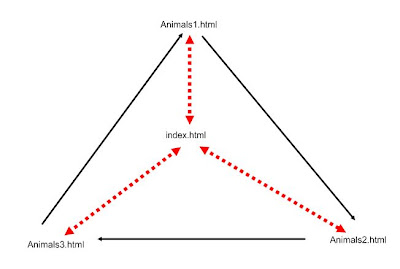
1. Create HP matching exercise Ex1. Connect it to the index.html. Make sure you have all the files, including images, in the same folder as the exercise. Save, export.
2. Create a HP multiple choice exercise Ex2.Connect it to the index.html. Carefully fill in the feedback! Save, export.
3. Create a HP gap fill exercise Ex3. Connect it to the index.html and Ex1.html. Save, export.
4. Connect Ex1 to Ex2, and Ex2 to Ex3. Save, export.
5. Open your index.html in NVU. Add links to all three HotPot exercises. Save.
6. Upload all files (index.html, Ex1.html, Ex2.html, Ex3.html, all images) to the web.


Do not forget:
+ No diacritics, no spaces in filenames.
+ Save everything you want to put online into a single folder. No subfolders.
+ Regularly save your changes.

 FAQ:

1. Do I have to use an authentic text in jcloze (gapfill) exercise?
YES.
Try to find an authentic text which will focus on the topic; some of the target vocabulary items should be included, but not necessarily all of them.
Such a text activates the passive vocabulary of the student, helps them understand the new words in context, and is much more informative than isolated sentences.

Tip: explore primary level sites for native speakers, e.g.
BBC for kids
British Council
Encyclopedia for kids


2. How do I make a good feedback in multiple choice?
Just follow these simple tips:
- DO NOT use capitals, exclamation marks, "NO!" "Unfortunately..." etc.
- be positive :) - do not start the feedback with "Sorry, no..."
- add extra information, eg.
Where do lions live? Chosen answer: "India"
Feedback: "Tigers live in India, but lions live in Africa."

3. How should I set the colour scheme?
- Remember that the text should be easy to read - the font and the background should be constrasting.
- The backgroud itself should not bee too bright, not to tire the eyes.
- study the Color Wheel site

4. What is the HotPot index?
It is a html file which includes links to all three hotpot exercises, and the basic info:
- the author
- the aim of the exercises, e.g. "Teaching the names of family members"
- the target group description, e.g. "Third grade, basic school, elementary level"

pondělí 10. února 2014

Welcome!


Credit Requirements

active participation, working on classroom tasks
80% attendance

Projects: (submission deadline April 10, 2014)
1. A personal website (includes: personal profile, photogallery of photos taken on your own, a page on your hobbies/interests including active links to references, HotPot index and exercises, a link to Interactive Board material)
2. Hot Potatoes project
3. Photogallery - choose an original and creative topic, take 6 images and present them; topic example: my town as I see it (not really tourist postcards, right?)

4. Interactive Board material (includes: T's book = target group, objectives; topic presentation and explanation, various tasks for practice, audio, video, illustrations, active links, inner links)


Task 1:
Create the index.html file in NVU.

Task 2:
Make an account on webzdarma.cz. Upload your index.html.


BASIC RULES:
1. Save, save, backup, save...
2. All in one folder
3. No spaces, no diacritics in filenames.

pondělí 25. listopadu 2013

Multiple Intelligences


Do you agree with this approach?
What MI type are you?

Take a test
How do you like the result? Do you feel it being more or less objective?

Howard Gardner's Site

Q. Can you summarize “multiple intelligences’ (MI) theory briefly?
"I developed MI theory in the late 1970s and early 1980s. In doing so, I drew on evidence from a
wide variety of sources, disciplines, and research tradition. I presented the theory for the first time in 1983, in my book Frames of Mind: The Theory of Multiple Intelligences.

The theory is a critique of the standard psychological view of intellect: that there is a single intelligence, adequately measured by IQ or other short answer tests. Instead, on the basis of evidence from disparate sources, I claim that human beings have a number of relatively discrete intellectual capacities. IQ tests assess linguistic and logical-mathematical intelligence, and sometimes spatial
intelligence; and they are a reasonably good predictor of who will do well in a 20th (NOT 21st)
century secular school.

But humans have several other significant intellectual capacities. In my original book, I described
musical intelligence, bodily-kinesthetic intelligence, interpersonal (social) intelligence, and
intrapersonal intelligence (understanding of self). A few years later, I added the naturalist
intelligence: the capacity to make consequential distinctions in the world of nature. I also have
speculated about two other possible intelligences: existential intelligence, the intelligence of ‘big
questions’; and pedagogical intelligence, the intelligence that allows human beings to convey
knowledge or skills to other persons."

http://howardgardner01.files.wordpress.com/2012/06/faq_march2013.pdf


Bonus
This does not really belong here, nevertheless, I could not resist.
First try yourself, than laugh.

http://www.buzzfeed.com/robinedds/its-thanksgiving-so-we-asked-some-brits-to-label-the-us-stat
http://www.buzzfeed.com/summeranne/americans-try-to-place-european-countries-on-a-map


pondělí 18. listopadu 2013

Krashen's Monitor Model

Find more about Krashen's five hypotheses.
Choose two of them, and think of an example from your own experience that corresponds with Krashen's definition. Enter your examples into the comments to this blog entry.


www.youtube.com/watch?v=NiTsduRreug&list=PLBsTWGrcvuuAmVAr20Siux1eoNzU0HRsu

http://esl.fis.edu/teachers/support/krashen.htm

http://www.sk.com.br/sk-krash.html

https://www.facebook.com/pages/Stephen-Krashen/182152158535031